
Comparing Text Commentary, Radio Coverage, and Live Statistics Sites When Video Match Streaming Is Unavailable
When a football stream fails, the match itself does not become impossible to follow. Official text commentary, licensed radio coverage, and live-statistics services can all preserve part of the experience, but each tells the story differently.
Text feeds are strongest for confirming discrete events such as goals, cards, substitutions, fouls, and injury stoppages. Audio commentary adds tempo, crowd reaction, and tactical interpretation. Statistics can show possession, shot quality, passing patterns, and attacking pressure, but they depend on the definitions and models used by the data provider.
The most useful fallback therefore depends on what you want to know. If the priority is simply whether a goal was awarded, an official event feed may be enough. If you want to understand how the game feels without video, audio becomes much more valuable. If you are trying to judge whether one team is creating better chances, live data can add information that neither text nor radio conveys precisely.
Event-Level Detail in Text Commentary
A good text feed should be judged by how well it records changes in the match rather than by how many sentences it publishes.
The official Premier League Match Centre, for example, provides minute-stamped text commentary that records events including fouls, substitutions, yellow cards, and delays caused by injuries. Recent official match pages show these events recorded individually rather than summarized only at half-time or full-time. citeturn570912search2turn570912search19
For practical use, four event types deserve particular attention:
Goals and major decisions
The feed should identify the scorer, match minute, and any later decision that changes the event, such as an own-goal attribution or disallowed goal.
Substitutions
A useful entry identifies both the player entering and the player leaving. This matters when trying to understand a tactical change without video.
Fouls and disciplinary action
The feed should distinguish an ordinary foul from a yellow or red card rather than making the reader infer the consequence.
Injuries and stoppages
An injury notice helps explain why the match clock is continuing while little action appears in the feed.
Opta’s football event definitions show why terminology matters. Its standardized data rules define events such as goals, shots on target, ball recoveries and other actions consistently across its collection system. For disputed goal attribution, Opta applies its own rules and, where appropriate, aligns the result with the relevant competition or governing body. citeturn526178view3
That makes short event descriptions useful for cross-checking.
Suppose one text service says:
67′ Goal – Player A
while another temporarily shows:
67′ Own goal – Player B
Do not decide immediately that one site is unreliable. Check the official competition record after the event has been reviewed. Live feeds can initially publish provisional information that is corrected later.
A practical test is to record ten major events from one match and compare:
event on pitch → first text appearance → later correction, if any → final official record
That reveals both update speed and correction quality.
Radio Commentary Detail and Editorial Perspective
Text can confirm what happened, but audio is much better at explaining what the match currently feels like.
A strong radio commentator can communicate that one side has dropped deeper, a full-back has stopped overlapping, the crowd has become nervous, or a substitution has changed the rhythm before those developments appear clearly in the statistics.
Official audio coverage remains an important part of football broadcasting. For the Premier League’s 2025/26 to 2028/29 UK rights cycle, BBC and talkSPORT hold live audio packages covering specified fixture slots. citeturn526178view1
Club-owned media can provide another audio option. Manchester United states that MUTV provides live audio commentary for every men’s first-team match during the season even when broadcast rights prevent MUTV from showing the live video. It combines that commentary with pre-match, half-time, and post-match programming. citeturn526178view2
Those two types of feed should not automatically be treated as equivalent.
A national broadcaster is normally producing coverage for a broad audience. A club service is produced within the club’s own media environment and is naturally designed for supporters of that team. That does not make club commentary inaccurate; it changes the perspective from which the match is described.
The difference becomes obvious in moments such as:
- disputed penalties
- aggressive tackles
- referee decisions
- missed chances
- tactical criticism
- late goals against the team
For a supporter who wants emotional involvement, club commentary can be the more enjoyable choice.
For someone trying to understand the game without strong allegiance, a national or independent rights-holding audio broadcaster may be preferable.
Audio quality should be judged on specificity rather than excitement alone. During a ten-minute sample, listen for whether the commentators describe:
ball location → shape change → player movement → crowd response → reason for the change
A commentator repeatedly saying “great pressure” tells you less than one explaining that the opposition’s midfield has dropped five metres deeper and is allowing the full-back to receive the ball freely.
Statistical Definitions and Data-Provider Differences
Live-statistics pages create a different problem: two sites can show different numbers without either necessarily being broken.
The first question should be:
Who provides the data and how is the metric defined?
Opta states that its football collection uses standardized event definitions across data-collection centres so that events are recorded consistently. Its definitions cover more than simple goals and assists and specify how actions such as shots, recoveries and other on-ball events are classified. citeturn526178view3
Sofascore also identifies Opta as a long-term data partner for important parts of its football data. citeturn526178view6
Expected Goals is a particularly useful example of why provider identity matters.
Hudl Statsbomb defines xG as the estimated probability of an individual shot becoming a goal, based on historical shots with similar characteristics. Its documentation explicitly notes that different xG models can give different values for the same shot because the models do not necessarily use the same inputs. A simpler model may use shot distance, angle, body part and previous action, while Statsbomb’s own model can incorporate additional contextual information such as goalkeeper and defender positions. citeturn526178view4
Therefore:
Site A: 1.42 xG
Site B: 1.67 xG
does not automatically mean one site calculated incorrectly.
It may mean that the providers use different models or datasets.
The same caution applies to terms such as “attack momentum,” “dangerous attacks,” or “possession value.” These are not universal football laws with one mandatory calculation.
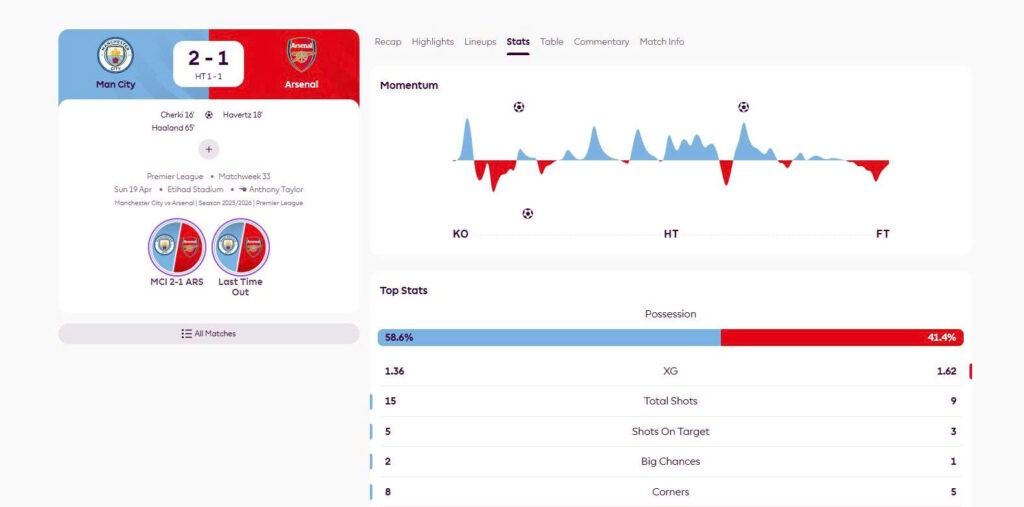
Sofascore’s current Attack Momentum feature, for example, says that the underlying system was developed by Opta and evaluates factors including possession, progressive passes, build-up play, recoveries and attacking sequences. The visualization is calculated minute by minute to represent which team is generating more dangerous attacking situations. citeturn526178view5
That is different from ordinary ball-possession percentage.
Before comparing live-statistics sites, make a small definition record:
| Metric | Provider | Meaning to verify |
|---|---|---|
| Possession | Named data supplier | Method used to assign control |
| xG | Opta, Statsbomb, other | Variables included in shot model |
| Attack Momentum | Platform/provider-specific | Inputs and time window |
| Pass success | Data provider | What counts as attempted/completed |
| Duels won | Data provider | Definition of duel and winning action |
A difference becomes meaningful only after the definitions are aligned.
Text, Audio, and Statistics Latency
The three fallback formats rarely arrive at exactly the same time.
There is no reliable universal rule that text is always first, audio is always second, and statistics are always third. The path from stadium to user differs by competition, provider, device, buffering settings, and network conditions.
Opta describes its football data as being captured in real time by trained analysts, while its broader live-data infrastructure is designed to deliver events rapidly to downstream products. citeturn456885search7turn570912search51
Audio has a different production chain. Commentary must be captured, encoded, distributed and buffered before reaching the listener. The stream may deliberately maintain several seconds of buffer to avoid interruptions.
Text commentary may be entered manually or generated from an event-data feed. Statistics can require an event to be classified before the displayed number changes.
The only useful latency comparison is therefore made during the same match.
Choose one device or synchronized clock and record five unmistakable events:
kickoff
goal
yellow card
substitution
full-time whistle
Then note:
| Event | Audio | Text | Statistics |
| Goal | +__ sec | +__ sec | +__ sec |
| Card | +__ sec | +__ sec | +__ sec |
| Substitution | +__ sec | +__ sec | +__ sec |
Repeat this across several events. One unusually delayed update should not define the whole service.
Spoiler Control Across Multiple Screens
Using all three sources simultaneously can actually make the experience worse.
Imagine listening to audio commentary with a five-second buffer while a statistics app updates almost immediately. The phone may display:
GOAL 2–1
before the commentator has even described the attack.
The next ten seconds of radio commentary lose much of their suspense.
Push notifications can cause the same problem. A goal alert from one app may arrive before an audio stream catches up.
If audio is the main experience, disable score notifications and avoid watching the score banner continuously. Open statistics during breaks in play or after major events instead.
If rapid information matters more than suspense, reverse the priority: keep the fastest event feed visible and use audio only for explanation.
A practical configuration is:
Radio-first viewing: notifications off, text checked only when clarification is needed.
Data-first viewing: live score visible, audio used for tactical context.
Text-first viewing: official commentary open, statistics checked after important sequences.
The goal is not to use every available source continuously. It is to prevent faster feeds from spoiling slower ones.
Match Reconstruction Without Video
When video is completely unavailable, the three formats can reconstruct much of a football match when used together.
Start with text for event chronology.
If the official feed shows several fouls, an injury stoppage and a substitution within five minutes, you know the rhythm has been disrupted even without seeing the pitch. Official Premier League commentary regularly records precisely these kinds of events. citeturn570912search35
Use audio for the missing spatial and emotional information.
A commentator can tell you whether a substitution changes formation, whether the crowd is responding angrily to the referee, or whether a team is continuing to attack despite possession statistics suggesting otherwise.
Then use live statistics to test the impression.
If the commentary says a team has become much more dangerous, look at its recent shots, xG, possession value or momentum rather than only the overall possession percentage. Sofascore’s Opta-derived Attack Momentum is designed specifically to display changes in attacking dominance minute by minute rather than merely the final score. citeturn526178view5
The result is a three-layer match record:
Text: what happened.
Audio: how it happened.
Statistics: how much the measurable pattern changed.
Practical Fallback Selection by Viewing Purpose
For a low-bandwidth connection, text commentary is the simplest fallback. It uses little data and makes important events easy to verify later.
For driving, walking or situations where looking at a screen is impractical, licensed audio commentary is more useful because it can carry the match continuously without requiring visual attention.
For tactical analysis, live statistics become more valuable, but only when the data provider and metric definitions are understood.
A useful final process is:
official text feed → licensed audio source → identified statistics provider → latency test → notification settings
Do not choose a statistics service merely because it displays more numbers. Do not assume a team radio feed is neutral. Do not assume that whichever source reports a goal first is always the most accurate.
The best fallback is the one that preserves the part of the match you care about: official events, narrative context, or quantitative analysis. When those three are combined carefully, a failed video stream becomes an inconvenience rather than a complete loss of the match.